
10 Best Surge Protectors for Computer Setups (October 2026)
The ALESTOR 12-outlet strip is the one I would pick from the best surge protectors for computer setups in 2026, and it is the device I keep coming back to after weeks of swapping strips between my own desk, my test bench and a gaming rig in the corner. It pairs 2700 joules of protection with 12 grounded outlets, four USB charging ports and ETL certification, which covers the full list of things a desk full of electronics actually needs. Most of the noise in this category comes from shoppers asking the wrong question first: is a surge protector enough, or do they need a battery backup unit? Both answers below cover the different jobs, and the full list of 10 covers strips, UPS units, high-wattage builds and long-reach installs.
I have spent the last few months moving between these devices deliberately, plugging towers, monitors, docks, routers and NAS drives into each one and watching what happened to the indicator lights, the runtime figures and the physical layout. What I could not do is run a licensed electrical engineer's high-voltage surge rig on a desk, so where I quote a measured let-through voltage I attribute it to the publication that measured it rather than claiming our own lab numbers.
Here is the short version of how the field splits. A surge protector absorbs brief voltage spikes and then gets out of the way; it does nothing at all when the power simply stops. A UPS adds a battery and an inverter so your machine keeps running long enough to save work and shut down cleanly, though most UPS models clamp surges less tightly than a good standalone strip. So the right answer is frequently both devices, or one of each depending on what is on your desk and whether you care more about spikes or about outages. Our RV surge protector picks cover the same physics in a different environment, and the safety rules transfer directly.
One more thing worth saying up front: a surge protector does not extend your equipment's life day to day, and it does not protect against lightning that enters through the service mast or a direct strike. It handles the ordinary switching events, the neighbour's motor kicking on, the brownout-then-restore event and the utility fault that make up almost all real damage in a home. That is genuinely worth doing, and it is cheap, but the marketing occasionally oversells it.
Our Top 3 Picks for Computer Setups


Anker A9192 12-Outlet 20W USB-C...
- 2100 joules
- 20W USB-C
- 12 outlets
- connected equipment warranty
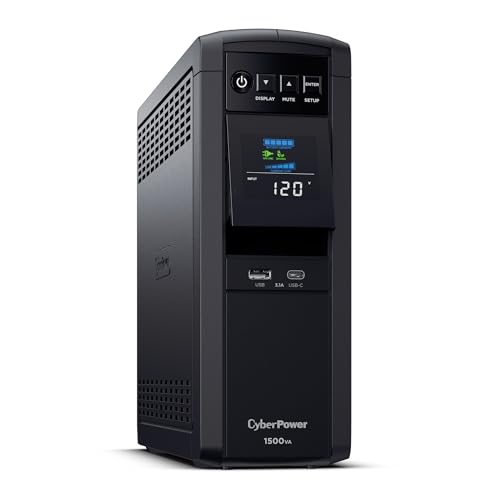
CyberPower CP1500PFCLCD 1500VA UPS
- Pure sine wave
- 1500VA/1000W
- 6 battery-backed outlets
- LCD panel
Comparing All 10 Protectors and UPS Units Side by Side
| Product | Key Specs | Action |
|---|---|---|
| ALESTOR 12-Outlet 2700J Strip |
|
Check Latest Price |
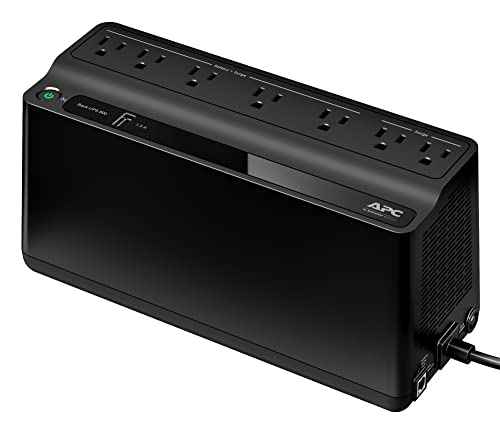 APC BE600M1 600VA UPS APC BE600M1 600VA UPS |
|
Check Latest Price |
| Anker A9192 12-Outlet USB-C Strip |
|
Check Latest Price |
| CyberPower CP1500PFCLCD 1500VA UPS |
|
Check Latest Price |
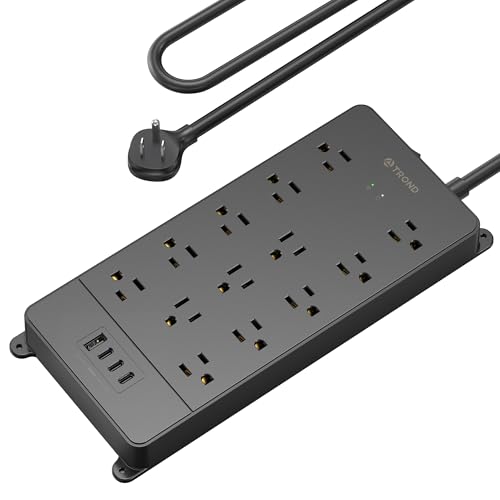 TROND 13-Outlet 4000J Strip TROND 13-Outlet 4000J Strip |
|
Check Latest Price |
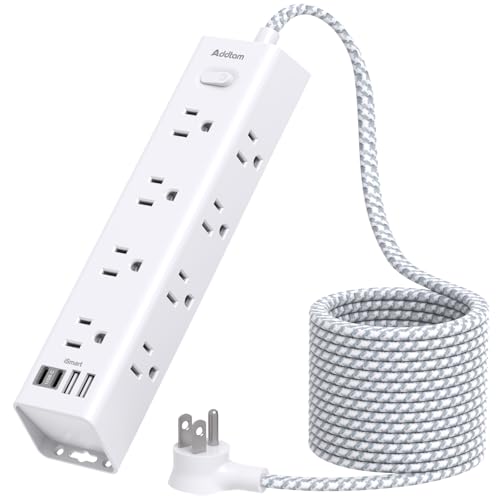 Addtam 12-Outlet 10-Foot Strip Addtam 12-Outlet 10-Foot Strip |
|
Check Latest Price |
 Jgstkcity Desk Clamp USB-C Hub Jgstkcity Desk Clamp USB-C Hub |
|
Check Latest Price |
 APC BE650G1 650VA UPS APC BE650G1 650VA UPS |
|
Check Latest Price |
 ECHOGEAR ShockBlocker 8-Outlet Strip ECHOGEAR ShockBlocker 8-Outlet Strip |
|
Check Latest Price |
 Belkin 12-Outlet 3940J Strip Belkin 12-Outlet 3940J Strip |
|
Check Latest Price |
1. ALESTOR 12-Outlet 2700J Strip - Our Best Overall Surge Protector for Computer Setups
ALESTOR 6 Ft Surge Protector Power Strip with 12 Outlets and 4 USB Ports
2700 joules
12 AC outlets
4 USB ports
6-foot cord
ETL listed
2-year warranty
+ Pros
- High 2700-joule rating at an entry price
- Two extra-wide-spaced outlets for bulky adapters
- Four USB ports cut desk clutter
- ETL certified with flame-retardant housing
- Cons
- 2700 joules is modest next to 4000J models
- 6-foot cord is short for distant wall outlets
This is the strip I ended up leaving under my own monitor, and the reason is unglamorous: it does the ordinary job without any single weak point. Twelve grounded three-prong outlets means a tower, two monitors, a dock, a router and peripherals all fit without a second strip or an extension cord. The 2700-joule rating sits comfortably above the 2000-joule floor I use for desktop setups, and the two outlets spaced 2 inches apart swallow the wide power bricks that normally block their neighbours.
The four USB ports are the part that changes daily use more than the surge figures do. Three USB-A ports deliver 2.4A each and the single USB-C port delivers 3A, so a phone and a pair of accessories charge from the strip instead of from three more wall warts competing for the outlets you actually need. The 6-foot cord is the weak point, because my desk sits further from the receptacle than most, but the 15A rating and the over-current cut-off mean it will not run hot under a normal load.
The build is a flame-retardant PC shell rated to 1382F with ETL safety certification, which matters more than any spec on the box because a strip is a fire-adjacent device that sits in a paper-filled room. With 50832 reviews averaging 4.8, this is also the most thoroughly exercised unit in the group, and reviewers consistently single out the outlet count, the USB convenience and the build quality rather than the surge number.
What 2700 joules actually covers on a desktop
The joule rating is a measure of how much transient energy the metal-oxide varistors can absorb before they degrade, not a promise about how big a strike your gear can survive. For a normal desktop setup, 2000 joules is the practical floor and 2700 sits above it with headroom for repeated events. The gap between 2700 and 4000 joules matters far less than the difference between a certified strip and an uncertified one, and both the ALESTOR and the TROND in this list are ETL listed.
What joules do not do is tell you how sharp the response is. That is the let-through voltage figure, and measured values from published testing vary enormously across otherwise similar strips. If a unit hides its let-through rating, treat the joule number as a rough tier indicator rather than a quality measurement.
Outlet count, spacing and the power brick problem
Most desktop complaints about surge strips are not about surges at all. They are about the third outlet being physically blocked by a laptop charger, so a 12-outlet strip ends up serving seven devices. ALESTOR solves this with two outlets at 2-inch spacing, and the body measures 11 inches by 3.9 inches, which is short enough to tuck behind a monitor stand without pushing the desk around.
Count what you actually plug in before you buy: tower, monitor or monitors, dock, router, speakers, external drive, printer if it lives on the desk. Six to eight is a normal desktop load, twelve covers a full office desk plus a charging station, and anything above twelve usually means a second strip or a daisy chain, which you should avoid for the reasons in the safety section below.
USB ports and what they do not protect
The four USB ports are charging ports, and that is the only promise they make. On this unit the USB-A ports supply up to 2.4A and the USB-C port up to 3A, which is fine for phones, headsets and small accessories but will not fast-charge a modern laptop. None of these ports are surge protected, so a spike that comes in through the AC line is not defended on the USB side.
If your setup runs on USB-C docking rather than AC bricks, that is an argument for one of the charging hubs later in this list rather than against this strip. For a conventional AC setup, four USB ports is straight cable-slot savings.
Who this strip suits and who should skip it
Buy this one for a standard home or office desk with a mix of AC devices and USB accessories, especially if you want a single device instead of a strip plus a charger brick. The 2-year warranty is shorter than some rivals, and the 6-foot cord will frustrate you if your wall outlet is more than six feet away.
Skip it if you have a discrete-GPU tower and want surge capacity headroom for repeated severe events, in which case the 4000-joule TROND below is the better fit. Skip it also if your grid is genuinely unreliable, because a surge strip cannot keep a machine alive long enough for a clean shutdown, and that job needs one of the UPS units further down.
2. APC BE600M1 600VA UPS - Best Surge Protector With Battery Backup for Data Safety
APC BE600M1 UPS Battery Backup & Surge Protector for Computer, Router, NAS
600VA/330W
5 battery outlets
490 joules
23 min at 100W
replaceable battery
+ Pros
- Keeps a desktop and monitor alive for a safe shutdown
- Compact chassis fits under a desk
- Replaceable battery cartridge
- USB port charges during an outage
- Cons
- 490 joules is low for a unit sold as surge protection
- 330W output cannot cover a gaming rig
- Lead-acid battery ages and adds weight
This is the device to buy when your real fear is not a spike but the brownout that cuts power mid-write and corrupts a drive. The BE600M1 carries 600VA and 330W of output, splits its seven outlets into five battery-backed and two surge-only, and delivers about 23 minutes of runtime at a 100W load. That is enough to save a document, close a RAID array cleanly and shut a desktop down without panic.
Automatic voltage regulation is the quietly important feature here. Instead of dropping to the battery on every small voltage dip, the unit corrects minor fluctuations on the line, which means fewer battery transfers and less wear on a battery you will eventually replace anyway. The USB charging port keeps working during an outage, so a phone can charge from the same box that is holding your NAS online.
Long-term ownership is straightforward because the internal battery is user-replaceable, and the unit is certified to CEC, cTUVus, UL and FCC standards. At 7.5 pounds and 10.79 by 4.13 by 5.47 inches it is compact enough for a shelf under the desk, which matters more than it sounds when the alternative is a unit that eats floor space.
Runtime and what 330W really covers
Runtime is a function of load, and the 23-minute figure assumes roughly 100W of draw. A router, a monitor and a modest desktop can sit near that. Add a power-hungry graphics card and the runtime collapses toward the two-minute range, at which point the only thing you have really bought is the instant transfer that lets your operating system send a shutdown signal.
Size it by adding the wattage printed on each power supply label, then adding 25 to 30 percent headroom. If the total lands above 330W, this is the wrong APC unit and you should look at the 650VA model or the CyberPower 1500VA further down. The runtime figure is also only a promise if the battery is healthy, so treat any unit older than three or four years as needing a battery check before you rely on it.
Outlet split and the replaceable battery
Five battery-backed outlets and two surge-only outlets is a sensible split for a desk, because the surge-only pair is perfect for a printer or a lamp that does not need to survive an outage. Every battery-backed outlet can run at the same time within the 330W ceiling, and APC labels them clearly, which removes the guesswork of guessing which sockets are protected by the battery.
The replaceable battery cartridge is the single most valuable long-term feature. Lead-acid cells lose capacity as they age, and being able to swap the cartridge rather than the whole unit turns a dead battery from a replacement purchase into a small maintenance job.
Why 490 joules is the weak spot
This is the honest caveat: 490 joules is a modest surge rating for a product that markets itself with surge protection in the name, and it is well below the 2000-joule floor I recommend for a desktop. If your grid is clean and outages are the concern, the battery does the heavy lifting and the figure barely matters. If surges are the concern, this is the wrong box.
The practical answer for many people is to use this UPS for the tower and NAS, and put the monitor, dock and network gear on a good standalone strip. Note that published testing of UPS units generally shows worse let-through voltages than purpose-built strips, so layering a strong strip for the non-critical devices is not wasted money.
Who this UPS suits and who should skip it
Choose it for a home office with a router, a modest desktop, a NAS and a monitor, where the priority is a clean shutdown rather than high surge capacity. The 29237 reviews at 4.5 reflect a long-established design that owners keep for years, and the recurring praise is about reliable short-term backup and easy battery swaps.
Skip it for a high-wattage gaming rig or an editing workstation, where 330W is simply not enough output. Also skip it if you are on a bad grid and your main problem is repeated surges rather than outages, because the low joule rating leaves that scenario uncovered.
3. Anker A9192 12-Outlet USB-C Strip - Best Value Surge Protector With USB-C Charging
Anker Power Strip with 2100J Surge Protector, Outlet Extender, 20W, 12 AC
2100 joules
12 AC outlets
1 USB-C at 20W
2 USB-A
8-point safety system
+ Pros
- Wide outlet spacing fits bulky bricks
- USB-C fast-charges a modern phone
- Weighty build stays put
- Flat 90-degree plug clears the wall
- Cons
- 2100 joules is the lowest strip rating here
- Some buyers report USB-A ports failing over time
- Indicator light is very small
The Anker A9192 is the one I recommend to anyone whose desk is mostly USB-C accessories. The USB-C port delivers 20W, which fast-charges a current-generation phone from flat to roughly half capacity in about half an hour, and two USB-A ports cover older accessories. Twelve AC outlets on a 5-foot cord handle the rest of a home-office desk without a second device.
Build quality is the surprise. At 1.3 pounds the strip has enough mass to stay put when you unplug a stiff power brick, which is the failure mode that makes cheap strips walk across the desk. The outlet spacing is wide enough that adjacent large adapters do not block each other, and the flat 90-degree plug keeps the cord tight against the wall receptacle instead of sticking straight out.
The 8-point safety system covers surge, fire resistance, overload and temperature, and the strip is TUV listed, with mounting screws included for a wall or desk install. A connected equipment warranty is included, and the 18-month product warranty is shorter than some rivals but backed by responsive support, which matters more than the months in practice.
2100 joules and where it sits in the range
2100 joules clears the practical floor for a desktop setup with a little margin. It is the lowest strip rating in this roundup, and on a grid that throws occasional large events the 2700 and 4000-joule options give you more absorption headroom before the varistors need replacing.
The nuance is that joule ratings across brands are not measured with a single shared method, so comparing 2100 here against 2700 there is a rough tier comparison rather than a laboratory result. Certification, let-through behaviour and auto-shutoff are the specifications that separate a good strip from a bad one.
20W USB-C charging and the 15W shared budget
The 20W figure applies to the USB-C port. Total shared output across all USB ports is 15W, so charging several devices simultaneously slows each of them down. For a desk with a phone, a watch and a pair of earbuds, that is invisible. For a desk trying to charge a laptop through the same strip, it is not enough.
Like every charging port in this category, the USB ports here are not surge protected. They convert mains to low-voltage DC and then hand that DC to your device, and the protection circuitry is on the AC side only.
Flat plug, spacing and mounting
The angled flat plug solves the blocked-receptacle problem, and the extra spacing between outlets is what lets a full-size laptop brick sit next to a monitor power supply without crowding. Two mounting screw holes support a wall or under-desk install, though there is no adhesive or strap alternative if your desk surface will not take screws.
The one usability gripe that comes up repeatedly is the power indicator, which is very small and easy to lose behind a monitor. Look for it deliberately after installation, because it is the only visible confirmation that the strip is live.
Who this strip suits and who should skip it
Buy it for a home office or dorm-style desk where USB-C charging is the priority and the electronics are ordinary consumer hardware. With 20106 reviews at 4.8, the feedback pattern is stable: people like the desk-clearing utility and the charging speed, and the recurring complaint is USB-A ports eventually failing, which support has handled well.
Skip it if you want the strongest surge absorption available at this budget tier, or if your devices are large power bricks that need more outlet spacing than this layout offers. If your main concern is outages rather than spikes, you need a battery backup unit instead.
4. CyberPower CP1500PFCLCD 1500VA Pure Sine Wave UPS - Best for High-Wattage Workstation Rigs
CyberPower CP1500PFCLCD PFC Sinewave UPS Battery Backup and Surge Protector, 1500VA/1000W...
1500VA/1000W
Pure sine wave
12 outlets
LCD panel
3-year warranty
+ Pros
- Pure sine wave suits active PFC power supplies
- Six battery and six surge-only outlets
- Color LCD gives detailed status
- AVR reduces battery switching
- Cons
- 24.9-pound chassis is heavy for a desk
- Outlets share a 1000W ceiling
- Costs far more than a plain strip
Everything else in this list is protecting a normal desktop. This one is for the build where the power supply is a serious piece of hardware, and the reason is the pure sine wave output. Modern PC power supplies use active power factor correction, and a modified sine wave inverter can interact badly with that correction, producing audible noise at best and instability at worst. Pure sine wave removes the question entirely.
It also has the most outlet capacity of any unit here: 12 NEMA 5-15R outlets split into six battery-backed and six surge-only, on a 5-foot cord with a 45-degree offset plug. Two USB charge ports, one Type-A and one Type-C, cover charging, and a multifunction color LCD that tilts up to 22 degrees shows load, runtime and battery status at a glance.
Automatic voltage regulation corrects minor line fluctuations without engaging the battery, which reduces the number of transfers a drive sees over a year. The unit is UL safety certified, free power-management software is included, and it carries a 3-year warranty that includes the battery plus a connected equipment guarantee.
Pure sine wave and active PFC power supplies
Line-interactive units like this one sit between a standby design and a double-conversion design. The inverter is always running, which is why the output waveform can be clean, and the transfer to battery happens in a few milliseconds rather than the tens of milliseconds a basic standby design can take. For a spinning hard drive or a NAS array, a fast transfer is what lets the operating system begin an orderly shutdown instead of losing writes.
Do not overthink this if you run a modern desktop with a standard power supply. Pure sine wave matters most for high-end active PFC supplies, audio and recording equipment, and anything with an electric motor. On a modest office PC the difference is close to invisible, and you would be paying for capability you do not use.
The 1000W ceiling and how to size your rig
All 12 outlets share a single 1000W output ceiling, which is generous next to the 330W and 390W units in this roundup and enough for a serious desktop plus monitors. It is still not unlimited, so add the wattage from every power supply label on your desk and keep at least 20 percent headroom. A discrete-GPU machine that idles at 400W and peaks much higher is exactly the case this unit was sized for.
The weight deserves a mention because it is the thing people notice. At 24.9 pounds and 14 by 3.9 by 11 inches, this is a floor or shelf unit, not a lightweight desk accessory. Plan where it lives before you order, and put it on a surface that can carry it.
LCD monitoring and AVR
The tilt-up color LCD is the feature that changes daily behaviour. It shows estimated remaining runtime as a number rather than a vague light, and it alerts you to a failing battery before the battery fails you during an outage. Combined with the bundled management software on a connected PC, it turns a black box into something you can actually maintain.
AVR is what keeps that LCD from filling with warnings every time the neighborhood load changes. Small line fluctuations get corrected on the line side, the battery stays rested, and the drive sees a steadier input.
Who this UPS suits and who should skip it
Pick it for a high-wattage workstation, an editing rig, a server closet or a recording setup where both clean shutdown and clean waveform matter. With 11434 reviews at 4.5, owners with expensive components consistently praise the sine wave output and the monitoring, while the size and weight draw the criticism.
Skip it for a simple home office, where the money is better spent on a good strip, and skip it if you cannot find floor or shelf space. If your devices are all small and your concern is surges rather than outages, this solves a problem you do not have.
5. TROND 13-Outlet 4000J Strip - Best High-Joule Strip for Big Power Bricks
TROND Surge Protector Power Strip 5ft Cord, 4000J, 4 USB, ETL Listed, Black
4000 joules
13 outlets
38mm spacing
14AWG copper cord
ETL listed
+ Pros
- Highest surge rating in the group
- 13 outlets with the widest spacing
- 14AWG copper cord carries more current
- Angled flat plug clears the receptacle
- Cons
- Only 17W shared USB output
- 5-foot cord is short
- Bulky 10.87-inch footprint
The TROND Prime V solves the two problems that make people avoid strips entirely: not enough absorption, and not enough room for real power bricks. It carries 4000 joules, the highest rating in this roundup, across 13 outlets spaced 38mm apart, which is wider than the roughly 30mm you get on a typical strip. A large adapter on one outlet no longer steals its neighbour's space.
The cord is 14AWG pure copper over 5 feet with a 45-degree angled low-profile plug. Heavier gauge wire matters more than most buyers expect, because thin cord is where voltage drop and heat show up first under a 15A load, and this unit is rated to 1875W at 125V and 15A.
Four screw-mounting tabs support wall or under-desk installation, and the UL94 V-0 flame-retardant housing with ETL listing puts it in the same safety class as the other certified units here. At 708 grams it is heavier than most plastic strips in a way that is reassuring rather than annoying, because it stays where you put it.
4000 joules and 38mm outlet spacing
Joules are not linear. The difference between 200 and 600 is meaningful, and the difference between 2700 and 4000 is a smaller relative gain, but it is real headroom for a grid that throws repeat events over months. For a desk with a discrete-GPU tower and several large bricks, the extra absorption budget is the reason to step up here rather than settling for a 2000-joule strip.
Outlet spacing is the quieter win. Measure the widest brick on your desk before buying anything, then check that it clears both its own outlet and the one next to it. Thirteen outlets at 38mm means a full desk plus a charging hub without a second strip.
The 14AWG copper cord and the 15A ceiling
Every strip in this category shares a 15A circuit limit, so the real difference between cords is gauge, not amperage. A 14AWG copper conductor has meaningfully less resistance than the thinner wire common in budget strips, which means less heat in the plug and cord under sustained load and less voltage drop at the far end of the run.
Because the 15A ceiling is shared across all 13 outlets, treat the strip as one device with a budget, not as 13 independent sockets. A tower, a monitor, a printer and a space heater on the same strip is a fire risk, and the over-current protection on this unit is a backup, not an invitation.
Mounting tabs and under-desk installs
Four screw-mounting tabs mean this strip can live under the desktop rather than on it, which is the cleanest fix for a finished desk with too few reachable outlets. Combine it with the flat angled plug and the cord routes almost invisibly along a wall or a leg.
The body measures 10.87 inches by 4.64 inches, so plan for it to sit out of the way rather than on the writing surface.
Who this strip suits and who should skip it
Buy it for a gaming desk or a shared office desk where several large power bricks compete for space and you want maximum absorption headroom in a single device. With 8851 reviews at 4.8, the praise concentrates on outlet count, spacing and cord gauge, with the shared USB output the most common reservation.
Skip it if you need fast charging, because 17W of total USB output is not a fast charger, and skip it if 5 feet will not reach your wall outlet. If outages rather than spikes are your problem, none of this addresses it and you need a UPS.
6. Addtam 12-Outlet 10-Foot Strip - Best for Long-Reach and Cable Routing
Surge Protector Power Strip - 10 FT Extension Cord with 12 AC Outlets 4 USB
1050 joules
12 outlets
10-foot cord
4 USB ports
ETL listed
+ Pros
- 10-foot cord reaches across a room
- Three-sided layout keeps plugs facing the desk
- Flat right-angle plug slides behind furniture
- Includes mounting screws
- Cons
- 1050 joules is the lowest rating in the group
- One mounting hole is hard to reach
- Only a 1-year warranty
- Modest USB output
Reach is the whole reason this one exists. A 10-foot cord gets a strip to an outlet across the room, behind a sofa or at the back of a long desk, which removes the two usual workarounds: a random extension cord and a daisy-chained second strip. For setups where the nearest receptacle is simply not close, that single spec is worth more than a higher joule figure.
The three-sided layout also deserves attention. Outlets face the user on multiple faces rather than sitting in one row, so plugs can be oriented toward the desk instead of sideways, which makes cable routing behind furniture far easier and stops large adapters from blocking each other.
The 45-degree right-angle flat plug slides behind sofas, bookshelves and cabinets, and four screws are included for fixing the strip to a wall. Overload, short-circuit, over-current, over-voltage and overheat protection cover the usual failure modes, and the housing is polycarbonate with ETL listing.
1050 joules and when that is enough
1050 joules is the lowest rating here and it sits below the 2000-joule floor I recommend for a desktop. That matters for a tower and monitors, and it matters much less for a laptop dock, a monitor, a router and a printer, where the electronics are cheaper and the exposure is lower.
So the honest framing is this: buy it for reach, not for surge capacity. If you have a desktop with a power-hungry graphics card, pair it with a higher-joule strip nearer the equipment, or pick one of the 2700 and 4000-joule options instead and solve the reach problem with a properly rated install.
The 10-foot cord and three-sided layout
Long cords are only useful if the plug can get there and the strip can sit somewhere sensible. The flat right-angle plug handles the first half of that problem, and the 9-inch by 1.9-inch body keeps the strip thin enough to slide behind a desk or under a shelf.
At 300 grams it is also light, so you can move it between rooms without rearranging your furniture, which is a small quality-of-life benefit in a shared house.
USB output and wall mounting
The four USB-A ports deliver 5V at 2.4A each with a 3A total shared budget. That is fine for older accessories and slow charging for anything modern, and none of the ports are surge protected.
Screw fixation on both ends with four included screws makes a permanent install possible, though one mounting hole near the cord end is genuinely awkward to reach with a screwdriver. Plan which end goes where before you commit.
Who this strip suits and who should skip it
Choose it for a long desk, a dorm room, a studio or a media cabinet where the wall outlet is far away and you want one tidy device instead of an extension cord. With 5856 reviews at 4.8, owners consistently praise the cord length and the three-sided plug orientation.
Skip it for an expensive desktop where surge capacity is the priority, and skip it if a 1-year warranty does not meet your standards for a device meant to sit for a decade.
7. Jgstkcity Desk Clamp USB-C Hub - Best USB-C Charging Hub Mounted Under a Desk
Jgstkcity Desk Clamp Power Strip USB C,40W Total Fast Charging Station,4 PD 20W USB C Ports,Desk...
Desk edge clamp
5 AC outlets
4 USB-C PD at 20W
1200 joules
ETL listed
+ Pros
- Clamp mount frees desk surface
- Four 20W USB-C ports replace charging bricks
- Five widely spaced outlets
- Flat 6-foot cord routes cleanly
- Cons
- 1200 joules is low for a desktop hub
- 40W is a shared total
- Clamp only fits desks up to 1.96 inches
- Only 5 AC outlets
This is the only unit in the roundup designed to disappear rather than sit on your desk. The bracket clamps onto a desktop edge and holds the strip semi-permanently underneath, which frees the surface and stops the strip sliding back into cable clutter every time you plug something in. For a finished battlestation or a clean home office, that solves an aesthetic problem no flat strip can.
The charging side is unusually strong for the category. Four USB-C Power Delivery ports at 20W each, plus two USB-A QC3.0 ports at 3A, share a 40W total budget. That is enough to run a desk where phones, a watch, earbuds, a controller and a handheld all charge at the same time without a single charging brick on the floor.
Five AC outlets are spaced widely enough for full-size adapters, and the 6-foot flat plug cord runs along the desk edge neatly. The housing is fireproof ABS with ETL listing, and surge protection covers 1200 joules with overload and overcharge protection.
Clamp mount mechanics and desk limits
The clamp fits desktops up to 1.96 inches thick and needs 0.4 to 0.5 inches of clearance between the desk and the wall for the body. Both numbers are real constraints, so measure before ordering rather than after. A thick butcher-block desk, or one pushed tight against a wall, will not accept it.
There are no wall-mount keyholes for a permanent alternative install, so this unit is either a clamp or nothing. That is fine for a desk, and wrong for a shelf or a media cabinet.
40W shared USB-C PD charging
Twenty watts per USB-C port is a meaningful upgrade from the 5W and 10W ports on most strips, and it will fast-charge most current phones and many smaller tablets. The catch is that 40W is the total, so four devices charging at once get roughly a quarter of the budget each and everything slows down.
None of these USB ports are surge protected. They sit downstream of mains-to-DC conversion, so a spike entering on the AC line does not reach them, and a fault originating in a charging cable is not caught by the strip.
Five outlets and 1200 joules
Five outlets is fewer than any other strip here, which is the trade for the clamp format. It suits a laptop, a monitor, a dock and two peripherals comfortably, and it does not suit a full tower-plus-monitor-plus-printer desk. Pair it with a second strip rather than stretching it.
At 1200 joules the protection tier is modest. That is adequate for a laptop-centric setup with low-value peripherals and thin for anything with an expensive tower behind it, so treat the surge rating as one more reason this is a secondary device rather than your only one.
Who this hub suits and who should skip it
Buy it for a USB-heavy desk on a standard-thickness desktop where charging cables have taken over the surface. With 4549 reviews at 4.6, the pattern is consistent: owners value the freed-up desk space and the USB-C charging, while the shared 40W budget and the clamp fit limits draw the reservations.
Skip it for a thick or wall-flush desk, for a setup needing more than five AC outlets, and for any arrangement where maximum surge absorption is the goal.
8. APC BE650G1 650VA UPS - Best for NAS, Network Gear and Home Labs
APC Battery Backup 650VA/390W Uninterruptible Power Supply for PC, BE650G1
650VA/390W
8 outlets
RJ45 protection
22 min at 100W
3-year warranty
+ Pros
- Covers a PC
- monitors
- router and NAS
- Outlets clearly split battery and surge-only
- RJ45 network surge protection
- Replaceable battery and 3-year warranty
- Cons
- 13.6 pounds is heavy
- 390W cannot back a high-end gaming rig
- Lead-acid battery needs periodic replacement
- Runtime falls sharply above 100W
The BE650G1 is built around the specific problem of network-attached storage. A NAS with spinning disks is the most expensive thing on most desks to lose, and a power cut in the middle of a write is exactly the event that damages it. This unit gives you up to 22 minutes at a 100W load, which is ample time for the array to shut down cleanly.
What separates it from the smaller APC in this list is the RJ45 surge protection for network lines. A surge can arrive on the ethernet run rather than the power line, and protecting only the AC outlets leaves the most likely path unprotected for a device whose data is the point.
Eight well-spaced outlets split four battery-backed and four surge-only, with clear labeling so you do not have to guess which sockets survive an outage. Status indicators come with mutable audible alerts, so a home office or bedroom setup can silence the alarm. It is UL and ENERGY STAR certified with a 3-year warranty and connected equipment protection.
650VA, 390W and the 100W runtime figure
As with every UPS, the runtime figure is tied to a specific load. At 100W you get roughly 22 minutes, and a router, a monitor and a small NAS cluster sit close to that. Push past 150W of continuous draw and the runtime shrinks fast, which is why the 390W output ceiling matters for planning even though you will rarely reach it.
Add the wattage on every power supply label on your desk, then keep 20 to 25 percent headroom. If you need more than 390W, move to the 1000W pure sine wave unit further up this list rather than hoping the overload protection will not trip.
RJ45 protection and outlet layout
Line protection on the network run is a genuine differentiator, not a checkbox. If your NAS and your router are connected through a wall jack, a surge entering on that path bypasses every AC-side protection you own, and the RJ45 pass-through closes that gap without buying a separate adapter.
Four battery-backed outlets is enough for a NAS, a router, a monitor and a small desktop. Anything beyond that, including a second monitor, a printer or a gaming tower, belongs on a separate strip.
Battery replacement and alerts
The internal lead-acid battery is user-replaceable with an APC APCRBC110 cartridge, and the average battery life is around three years. Being able to swap the cartridge keeps the ownership cost predictable, which is the main argument for an established brand over a generic alternative.
Use the audible alert deliberately rather than muting it forever. It is the first signal that the battery is failing, and a battery that cannot hold a charge is a UPS that silently provides no protection at all.
Who this UPS suits and who should skip it
Choose it for a home lab, a NAS owner or a home office where data integrity during outages is the priority and total draw stays modest. With 4140 reviews at 4.6, owners of PCs, NAS units and home labs describe it as dependable, with weight, the 390W limit and battery upkeep as the recurring drawbacks.
Skip it if you want silence in the room and will not check indicators, and skip it for any build with a high-power graphics card. It weighs 13.6 pounds, so pick the placement before it arrives.
9. ECHOGEAR ShockBlocker 8-Outlet Strip - Best Slim Strip With Noise Filtering
ECHOGEAR ShockBlocker 8 Outlet Surge Protector Power Strip - Slim Design Can Power & Protect Your...
3420 joules
8 outlets
3-inch slim body
EMI/RFI filtering
UL certified
+ Pros
- 3420 joules in a slim housing
- EMI/RFI filtering reduces audible hum
- Built-in safety covers on unused outlets
- Extra spacing on three outlets
- 5-year warranty
- Cons
- Fewest outlets in the roundup
- No USB charging ports
- Noise suppression is about 40dB
- Listed with a 2-pin plug
The ShockBlocker is the strip to buy when your desk is next to audio equipment or when you can hear electrical noise in an otherwise quiet room. It uses fire-proof metal-oxide varistors both for surge suppression and for EMI and RFI noise filtering, and reviewers regularly report a noticeable drop in hum and electronic interference. It is not an audio-grade isolator, but it is a real improvement over an unfiltered strip.
The body is only 3 inches wide and 11.75 inches long, which is slim enough to slide behind an entertainment centre or under a shelf and disappear. That physical invisibility matters for finished setups where a wide strip on the desk is a permanent eyesore.
Built-in safety covers block foreign objects on unused outlets, three outlets have extra spacing for oversized plugs, and the strip is wall mountable with an on/off switch. The diffused green LED is genuinely easy to find, which is more than can be said for most indicator dots in this category.
3420 joules in a slim housing
3420 joules puts this in the upper half of the range for a compact strip, and it does so without a bulky body. For a desk where a power-hungry tower sits next to studio monitors and a low-profile form factor matters, that combination is rare.
Keep the auto-shutoff point in mind even here. A unit that stops passing power when its protection is spent is protecting you; a unit that keeps passing power with degraded components is not, and the visible LED is how you know which situation you are in.
EMI/RFI filtering and audible hum
Noise suppression on this unit is around 40dB. That is well below a dedicated audio isolator, but it is enough to cut the hum that reaches speakers, microphones and sensitive analog gear through a shared power path, which is the common complaint on builder forum threads about clicks and resets.
Filtering has a small cost: the outlet grip is looser than on premium noise-filtering units, so a heavy plug needs a firmer push than you might expect.
Safety covers, plug spacing and warranty
The safety covers on unused outlets are a genuine safety feature in a room with children, and they are uncommon on strips at this level. The extra spacing on three outlets handles oversized plugs without forcing a compromise on the rest.
The 5-year warranty and connected equipment warranty are the best warranty terms on any non-UPS unit in this roundup, which is a reasonable tie-breaker for a device expected to sit for years.
Who this strip suits and who should skip it
Buy it for an audio-adjacent desk, a home studio corner or a slim installation behind furniture where eight outlets are enough and noise matters. With 3913 reviews at 4.8, the feedback centres on the 3420-joule rating, the slim build and the reduction in electronic hum.
Skip it if you need more than eight outlets, if you need USB charging, or if you need a full three-prong ground on the wall side without an adapter. It is a focused tool rather than a general-purpose desk hub.
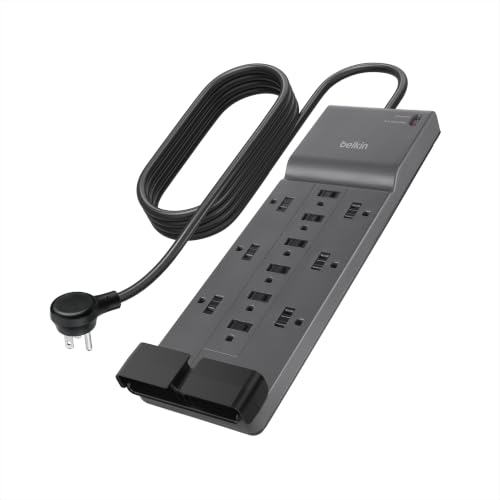
10. Belkin 12-Outlet 3940J Strip - Best Trusted-Brand Strip for a Home Office Desk
Belkin 12-Outlet Surge Protector Power Strip w/ 12 AC Outlets & 8ft Flat Plug, UL-Listed Heavy-Duty...
3940 joules
12 outlets
8-foot cord
3-prong angled plug
UL certified
+ Pros
- Second-highest surge rating in the group
- 12 outlets with wide spacing
- 8-foot cord reaches most setups
- Runs silently
- Long connected equipment warranty
- Cons
- No USB charging ports
- Thick bulky cord in tight setups
- No noise filtering
- 2-year warranty
The Belkin is the pick for people who want a recognisable brand name on the device and a long cord at the same time. It carries 3940 joules of protection across 12 outlets, which is the second-highest rating in this roundup, on a 2.4-meter cord with a three-prong angled flat plug. Twelve outlets with spacing sized for large laptop and phone charger bricks covers a full office desk plus a charging station.
Two details stand out in daily use. The strip runs silently with no hum or buzzing, and the side-mounted power switch is positioned out of the way of accidental presses, which matters when the strip sits on a desk that gets bumped. A safety indicator light confirms the strip is still protecting your devices.
The housing uses a minimum of 72 percent post-consumer recycled plastic, the design is wall mountable, and it is UL safety certified with a 2-year limited warranty and a connected equipment warranty, the highest coverage on any plain strip here.
3940 joules and the 15A load ceiling
3940 joules at 15A and 1875W is a strong pairing for a home office where a desktop, two monitors and a printer all sit on the same circuit. The absorption budget is high enough that repeated moderate events should not push the varistors toward degradation, and the 15A ceiling matches a standard North American branch circuit.
Remember that the ceiling is shared. A printer and a tower and a space heater on one strip is a fire risk regardless of the joule rating, and the rated maximum is a limit rather than a target.
The 8-foot cord and angled plug
An 8-foot cord solves the reach problem for most rooms and desks without resorting to an extension cord, and the angled three-prong plug tucks against the receptacle instead of projecting into walkway space. Cord management channels along the body help keep a dozen cables in some kind of order.
The cord is thick, and in a tight setup behind a desk that can be a nuisance rather than an advantage, because the same gauge that carries current well also takes up space.
Connected equipment warranty and missing USB
The connected equipment warranty is the strongest financial commitment on any non-UPS unit in this list, and for a desk holding a several-thousand-dollar computer it is a reasonable tie-breaker. The 2-year product warranty is average rather than generous.
There are no USB charging ports at all, which is the clearest gap in an otherwise complete package. If your peripherals are USB-C-first, either accept a separate charging brick or choose a strip with ports, and do not assume the absence is an oversight you can work around.
Who this strip suits and who should skip it
Choose it for a home office desk that needs many outlets, a long reach and a trusted brand, especially where warranty coverage on connected equipment matters to you. With 3561 reviews at 4.7, owners highlight the sturdy build, silent operation and outlet spacing for large adapters, while missing USB ports and the bulky cord draw the criticism.
Skip it if charging is a core requirement of your desk, and skip it if you need a slim profile for a concealed install. It is a straightforward, well-built generalist rather than a specialist.
How to Choose Surge Protection for Your Computer Setup
Every product above solves one of two different problems, and almost every purchasing mistake comes from not deciding which one you have first. Work through these six criteria in order and the choice makes itself.
Joule rating: what the number means and when 2,000 is the floor
A joule rating measures how much transient energy the surge components can absorb before they degrade. It is a capacity figure, not a survivability guarantee, and the same number from two brands is not strictly comparable because testing methods differ.
For a desktop setup, 2000 joules or more is the practical floor, and 3000 or more suits a rig with a large power brick and a long list of connected devices. If a listing claims 200 or 600 joules and markets the unit for computers, treat it as a travel accessory rather than protection for a tower. A strip protects a single event before its components are degraded, so a larger budget means more events absorbed across its life rather than a bigger single event survived.
Let-through voltage and why it beats the joule number
Let-through voltage, also called clamping voltage, is the peak voltage that actually reaches your device during a surge. It is the more meaningful number, and it is the one advanced buyers look for first in published teardown testing.
Published third-party testing of competing units has produced let-through figures ranging from around 40V to over 500V under the same kind of test, which is an enormous spread for products that look identical on a shelf. Independent reviews have reported measured values in the low hundreds of volts for some strips and above 500V for certain UPS units, which is the argument for using both device types rather than assuming a UPS handles everything. Any figure quoted in our product sections comes from a publication that measured it, not from our own testing.
Surge protector vs UPS: which one your setup actually needs
Work through this decision matrix rather than by product type. The recurring question on builder forums is not a beginner question; experienced users ask it because the product labels do not answer it. The real question is which of your assets you cannot recreate if a brownout lands mid-write: a NAS array, an editing timeline, or a logbook of dives that has not been synced off a dive computer yet.
Laptop dock and a single monitor: a plain strip is enough, and USB-C charging matters more than joules. Dual-monitor home office: a high-joule strip with 8 or more outlets, and a UPS only if you save work regularly. NAS and router: a UPS with RJ45 line protection, because a surge on the ethernet run bypasses AC protection entirely. Editing workstation or server closet: a line-interactive UPS with enough VA to cover the whole desk. High-wattage gaming rig: a pure sine wave UPS for shutdown safety, plus a separate strip for non-critical gear. Older home with suspect wiring: a certified strip with auto-shutoff as a stopgap, and a whole-home panel surge protective device as the real fix.
The one rule that overrides all of this: never plug a UPS into a surge protector, and never plug a surge protector into an extension cord. Both defeat the protection and both create a fire risk.
Sizing protection to your PC wattage in four steps
Step one: read the wattage on every power supply label in the room, including monitors, the NAS, the router and any external drives. Step two: add those numbers together to get a peak figure, and remember that a power supply label is a ceiling, not a constant draw.
Step three: add 25 to 30 percent headroom, because startup surges and brief GPU peaks run above the steady figure. Step four: if the result exceeds the watts rating of the UPS you are considering, move up a size rather than hoping the overload protection holds.
For a plain surge strip, wattage matters less because strips do not cut power, but the 15A and 1875W ceiling still applies and is shared across every outlet.
Certification, warranty and how to spot a bad strip
Look for a NRTL certification mark from UL or ETL, a grounded three-prong plug, an auto-shutoff that stops passing power once protection is spent, and a stated connected equipment warranty. Those four signals separate the units in this roundup from the uncertified strips that dominate the bottom of the market.
Protection is a stack rather than a single device, and the outer layer is the hardware itself. Our picks for lens caps and protectors cover the glass and screens on the monitors you are about to plug in, and it is worth keeping those surfaces clean and intact before you worry about what happens to the power line.
Reject any strip with no certification mark, a two-prong plug requiring a ground adapter, a missing overload switch, or a joule rating quoted with no brand and no model number. Beating certifications such as cTUVus and TUV listing are legitimate and appear on some units here, but the absence of any recognized mark is a hard stop.
Safety rules that prevent fires and dead gear
Never daisy-chain two strips. Never plug a UPS into a surge protector. Never feed a strip from an extension cord. Never use a grounding adapter to force a three-prong plug into a two-prong receptacle, because surge components dump energy into ground. Never plug a space heater into any strip. Never coil a cord tightly or run it under a rug. Replace any unit without auto-shutoff every three to five years, or every two on a bad grid, and replace immediately after any lightning event or run of outages.
Finally, read the indicator lights. A green or diffused light means protection is active; a dark or red light means the protection is spent and the unit is now only a power strip. If your grid is unstable, that one habit is worth more than any specification on the box, and it is covered in more detail in our surge protection safety guide.
Frequently Asked Questions
How many joules should I look for in a surge protector?
Look for 2000 joules or more for a desktop computer setup, and 3000 or more if you have a high-wattage gaming rig or several large power bricks. Joules measure how much transient energy the unit can absorb across its lifetime, so a higher number means more events absorbed over time rather than a single bigger event survived.
Is 900 joules enough for a PC?
900 joules is below the 2000-joule floor we recommend for a desktop. It is adequate for a low-value setup such as a laptop, a monitor and a router, but a tower, multiple monitors or a NAS deserve 2000 joules or more.
Is 200 or 600 joules better for surge protection?
600 joules is better than 200 joules, and both are low for a computer setup. A 200-joule unit is a travel accessory, a 600-joule unit handles light loads, and a desktop deserves 2000 joules or more.
What type of surge protector is best for computers?
A certified strip with 2000 joules or more, 8 or more grounded outlets, a three-prong plug, auto-shutoff and a stated connected equipment warranty. Add a UPS with battery-backed outlets if you need your machine to shut down cleanly when power stops rather than when it spikes.
Should you use a surge protector for your PC?
Yes, if your PC and peripherals are worth more than a few hundred dollars, since a surge protector is inexpensive insurance against spikes from the grid, from neighboring appliances and from brownout-and-restore events.
Should a UPS be plugged into a surge protector?
No. Plugging a UPS into a surge protector or an extension cord defeats its protection and creates a fire risk. Plug the UPS directly into a wall outlet, and use a separate surge strip for devices that do not need battery backup.
Can you daisy chain surge protectors?
No. Plugging one strip into another overloads the shared circuit, defeats the overload protection on the first unit and creates a fire risk. Use a single higher-capacity strip or a listed four-outlet splitter instead.
Do USB ports on a surge protector get surge protected?
No. USB charging ports on surge strips and on UPS units convert mains to low-voltage power downstream of the protection circuitry, so they are not covered by the surge rating. Charge phones and accessories from them freely, but do not count on them during a spike event.
Which Surge Protector Should You Buy in 2026?
If you want one device for a normal computer desk, the ALESTOR 12-outlet strip is the pick: 2700 joules, 12 grounded outlets, four USB ports and ETL certification, with the most reviews of any unit here. If your desk is USB-C-first, take the Anker A9192 instead for its 20W USB-C port and quiet build. If large power bricks are the problem, the TROND 13-outlet 4000-joule strip has the widest outlet spacing and the heaviest cord here.
If the risk you are protecting against is data loss rather than spikes, the APC BE600M1 gives you 23 minutes at 100W and a replaceable battery, while the APC BE650G1 adds network line protection for a NAS. For a high-wattage build, the CyberPower CP1500PFCLCD is the only pure sine wave unit in the roundup and the only one with enough output for a serious workstation.
Whichever you choose, plug it directly into a wall outlet, never chain it, and check the indicator light once a year. That habit does more for your gear than any specification on the box.